A small application can have a perfectly good database and still make its team copy information into customer support or sales tools. That manual bridge becomes an irritation long before it justifies building an integration service.
What shipped
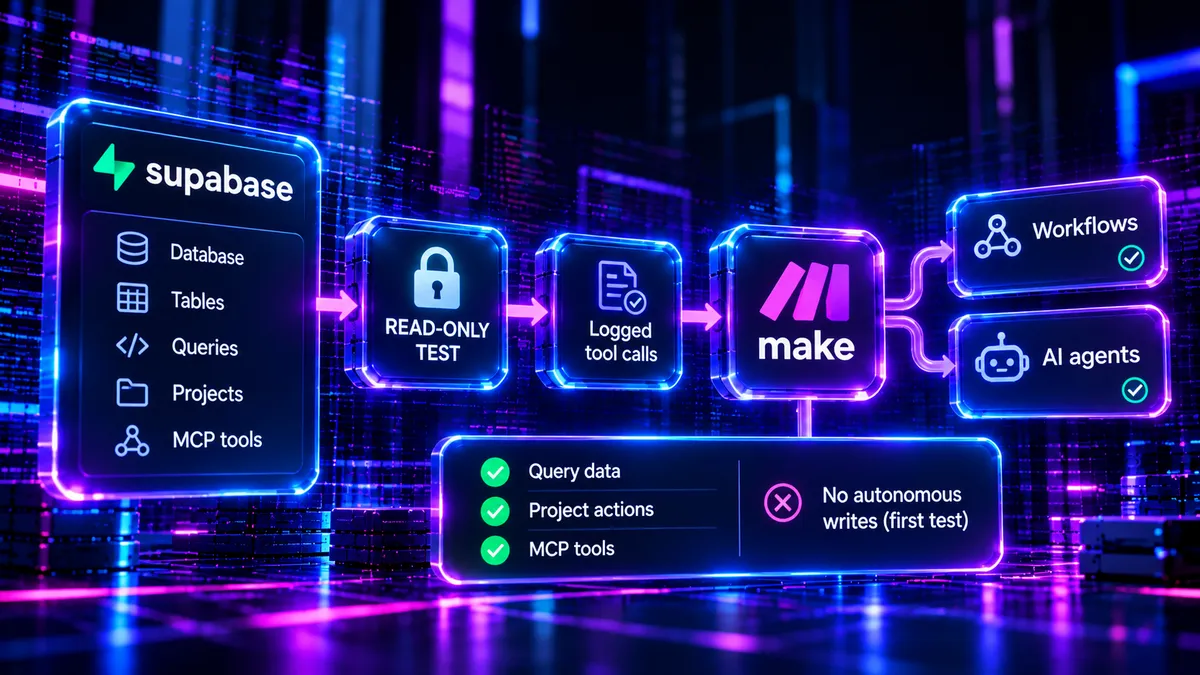
Make highlighted its Supabase integration in a November 12 community update. The connection provides ready-made modules for querying and updating database data, reviewing logs, deploying Edge Functions and managing project actions. Make scenarios and AI agents can also access Supabase's MCP server tools.
The integration was also described in a Supabase blog post dated October 28, so November 12 is a new Make product update and explanation rather than evidence that every component first launched that day. Make says the connection is available across all plans, including Free.
Its useful control is visibility into tool permissions. MCP actions are labelled by whether they are read-only or destructive, and scenario and agent calls are recorded in execution history. That makes access easier to review, though a label on its own does not prevent an inappropriate operation.
Why a small team cares
Consider a small agency running a customer portal on Supabase. Staff also keep incoming support requests in a helpdesk. They want to find a customer's current subscription status when a ticket arrives. A Make scenario can perform a narrow read-only lookup, match the customer identifier and add the result to the ticket, without maintaining a separate nightly CSV export.
That saves effort only if the data mapping is reliable. Duplicate email addresses, missing customer IDs and stale helpdesk records remain normal integration problems. A useful workflow needs a stable identifier, clear failure handling and a way to see what was read or skipped.
The other advertised actions are more sensitive. Updating production rows, deploying Edge Functions and managing projects can affect a live app. They need different permissions and approval boundaries from a support lookup.
Hype vs useful
MCP makes tools callable by agents, but access to a tool is not a reason to give an AI unrestricted control over it. An agent can make the wrong business decision using a technically valid database operation. Audited history helps investigate mistakes after the fact; it does not undo them.
My first trial would contain no writes. I would feed a Make scenario ten known support cases and check correct customer matching, result formatting, time saved and failures. Only after that would I consider a narrowly scoped update action, using least-privilege credentials and human approval where a mistake would matter.
For teams already running both Make and Supabase, this removes a chunk of integration plumbing. For everybody else, it is useful to know the option exists, not a reason to replace a working stack.